



Aller au contenu
View in the app

A better way to browse. Learn more.

Forum Automobile Propre

A full-screen app on your home screen with push notifications, badges and more.

To install this app on iOS and iPadOS
  1. Tap the Share icon in Safari
  2. Scroll the menu and tap Add to Home Screen.
  3. Tap Add in the top-right corner.
To install this app on Android
  1. Tap the 3-dot menu (⋮) in the top-right corner of the browser.
  2. Tap Add to Home screen or Install app.
  3. Confirm by tapping Install.

Le Cybertruck flottera
Featured Replies

Posté(é)

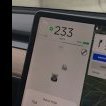
Elon a répondu par tweeter que le cybertruck pourra flotter pendant un certain temps.


Capture d’écran 2020-04-22 à 09.39.14.png

Modifié par Busquet2

Posté(é)

Comme tous les véhicules quoi... un certain temps.


Le temps de sortir par la fenêtre ou le toit ouvrant 🤣

  • 2 [?:ans plus tard...
Posté(é)

pour traverser à gué pas d'inquiétude : 

Vu le retard qu'il prend (>2ans) on peut dire que le Cybertruck coule plus qu'il ne vogue (flotte) :D

Après il n'y a rien de très révolutionnaire mais impose des contraintes à la conception étanchéité des ouvrants, des passages de tous les câbles électriques tout en les plaçant le plus haut possible, étanchéité de la porte pickup arrière,  etc...

Et bien sûr, vu le poids du véhicule (acier) et du pack de batterie il a intérêt à s'éloigner de la densité de l'eau pour ne pas couler trop vite !

Modifié par cornam

  • 1 an[?:ans plus tard...
  • 8 mois plus tard...
Posté(é)
Le 22/04/2020 à 09:40, Busquet2 a dit :

Elon a répondu par tweeter que le cybertruck pourra flotter pendant un certain temps.


un certain temps, mais pas très long le temps :

S7-en-realite-le-cybertruck-coule-comme-


Modifié par ManuTaden

  • 4 semaines plus tard...

Account

Navigation

Rechercher

Rechercher

Configure browser push notifications

Chrome (Android)
  1. Tap the lock icon next to the address bar.
  2. Tap Permissions → Notifications.
  3. Adjust your preference.
Chrome (Desktop)
  1. Click the padlock icon in the address bar.
  2. Select Site settings.
  3. Find Notifications and adjust your preference.