



Aller au contenu
View in the app

A better way to browse. Learn more.

Forum Automobile Propre

A full-screen app on your home screen with push notifications, badges and more.

To install this app on iOS and iPadOS
  1. Tap the Share icon in Safari
  2. Scroll the menu and tap Add to Home Screen.
  3. Tap Add in the top-right corner.
To install this app on Android
  1. Tap the 3-dot menu (⋮) in the top-right corner of the browser.
  2. Tap Add to Home screen or Install app.
  3. Confirm by tapping Install.

Petit bug visuel sur appli Tesla iOS
Featured Replies

Posté(é)

Bonjour,

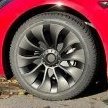
Depuis la dernière maj de l’appli Tesla sur iOS j’ai remarqué que le visuel de ma model 3 ne correspondais pas tout à fait à mon véhicule notamment les baguettes qui n’apparaissent plus noires comme auparavant.

Suis-je le seul dans cette situation? 
J’ai tenté une déconnection et une suppression du véhicule sur l’appli mais rien ne change… 


11043E77-6B1A-4396-B244-B2226F8D6DD7.jpeg

404E5A38-1BDD-4FE2-9D09-AB68078366A5.jpeg

Posté(é)

Bonjour,


Sujet déjà abordé dans le topic dédié aux MaJ de l’application Tesla :


En deux mots : pas de bug, juste un effet d’éclairage (cf répéteurs de clignotants).

Posté(é)
  • Auteur

Désolé pour ce doublon et merci pour l’info :)

Account

Navigation

Rechercher

Rechercher

Configure browser push notifications

Chrome (Android)
  1. Tap the lock icon next to the address bar.
  2. Tap Permissions → Notifications.
  3. Adjust your preference.
Chrome (Desktop)
  1. Click the padlock icon in the address bar.
  2. Select Site settings.
  3. Find Notifications and adjust your preference.