



Aller au contenu
View in the app

A better way to browse. Learn more.

Forum Automobile Propre

A full-screen app on your home screen with push notifications, badges and more.

To install this app on iOS and iPadOS
  1. Tap the Share icon in Safari
  2. Scroll the menu and tap Add to Home Screen.
  3. Tap Add in the top-right corner.
To install this app on Android
  1. Tap the 3-dot menu (⋮) in the top-right corner of the browser.
  2. Tap Add to Home screen or Install app.
  3. Confirm by tapping Install.

Votre couleur préférée pour l'Opel Mokka-e Finitions standards (hors GS-Line spécifique)
Featured Replies

Posté(é)

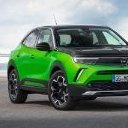
Bon, pour moi le choix est déjà fait et totalement assumé (Vert Ikone toit et capot Noir Karbon) mais pour vous, quelque soit votre VE préférée vers quelle couleur va votre préférence pour un Mokka e ?

Avec ou sans le toit Noir ?

Avec ou sans le capot Noir ?

Noir Karbon

V3DImage.ashx?client=SOLVCG&ratio=1&form

Vert Ikone

V3DImage.ashx?client=SOLVCG&ratio=1&form

Avec toit Noir

V3DImage.ashx?client=SOLVCG&ratio=1&form

Avec capot Noir (😍)

V3DImage.ashx?client=SOLVCG&ratio=1&form

Bleu Voltaik

V3DImage.ashx?client=SOLVCG&ratio=1&form

Avec toit Noir

V3DImage.ashx?client=SOLVCG&ratio=1&form

Avec Capot Noir

V3DImage.ashx?client=SOLVCG&ratio=1&form

Gris Kontrast

V3DImage.ashx?client=SOLVCG&ratio=1&form

Avec toit Noir

V3DImage.ashx?client=SOLVCG&ratio=1&form

Avec capot Noir

V3DImage.ashx?client=SOLVCG&ratio=1&form

Rouge Kosmos

V3DImage.ashx?client=SOLVCG&ratio=1&form

Avec toit Noir

V3DImage.ashx?client=SOLVCG&ratio=1&form

Avec capot Noir

V3DImage.ashx?client=SOLVCG&ratio=1&form

Blanc Arktis

V3DImage.ashx?client=SOLVCG&ratio=1&form

Avec le toit Noir

V3DImage.ashx?client=SOLVCG&ratio=1&form

Avec capot Noir

V3DImage.ashx?client=SOLVCG&ratio=1&form

Modifié par Mokkette

Posté(é)
  • Auteur

Au passage, en dehors de ces finitions "standards", la GS Line full black est sympa aussi... Peut-être un autre sujet sur la GS-Line du coup 😉


V3DImage.ashx?client=SOLVCG&ratio=1&form

  • 1 mois plus tard...
Posté(é)

Perso ma préféré en photo c'est la verte avec juste le toit en noir 🙂

Account

Navigation

Rechercher

Rechercher

Configure browser push notifications

Chrome (Android)
  1. Tap the lock icon next to the address bar.
  2. Tap Permissions → Notifications.
  3. Adjust your preference.
Chrome (Desktop)
  1. Click the padlock icon in the address bar.
  2. Select Site settings.
  3. Find Notifications and adjust your preference.